
Features
The work of finding stockists,
done every day and in plain sight.
Everything your agent does, you can see: who it found, why, what it wrote and what happened next.

Set it up with Katya
The setup decides how well your agents work. Katya, your setup coach, goes through it with you, section by section.
Reviews every section
At the end of What you sell, each agent, each ideal customer, your offer and each email there is a button: “Review with Katya”. She reads what you wrote, saved or not, with your website and the rest of your account, and tells you what to fix and why.
You decide every change
Each suggestion asks “Use this suggestion?”. Accept it and the field changes; otherwise yours stays. She never invents prices, minimums or discounts: if a fact is missing, she asks you for it.
Writes your emails
“Write it with Katya” drafts the whole email from your facts: the first one, a version B with another angle to test against it, and the 7-day follow-up. You see it first and use it only if you like it.
Fixes what review asks for
If your template review asks for changes, “Fix it with Katya” reads those notes and proposes how to solve each point. Reviewing again something that has not changed is free.
For stores, and now for companies too
If what you sell is a service for companies, choose “Companies” in Your business and your agents change how they work.
They look for who buys
Corporate clients, groups, event planners, touring productions and companies with teams traveling to your area. A hotel, for example, finds companies that need rooms for their teams and space for their events.
Near your cities
Give it the cities you care about and the search walks them in turn. Your competitors stay out.
An offer that fits them
The questions change to what a company decides on: who qualifies, billing, how they can see you first (a visit), and an introductory offer. The emails and their review speak their language.
Find
Stores that fit, every day
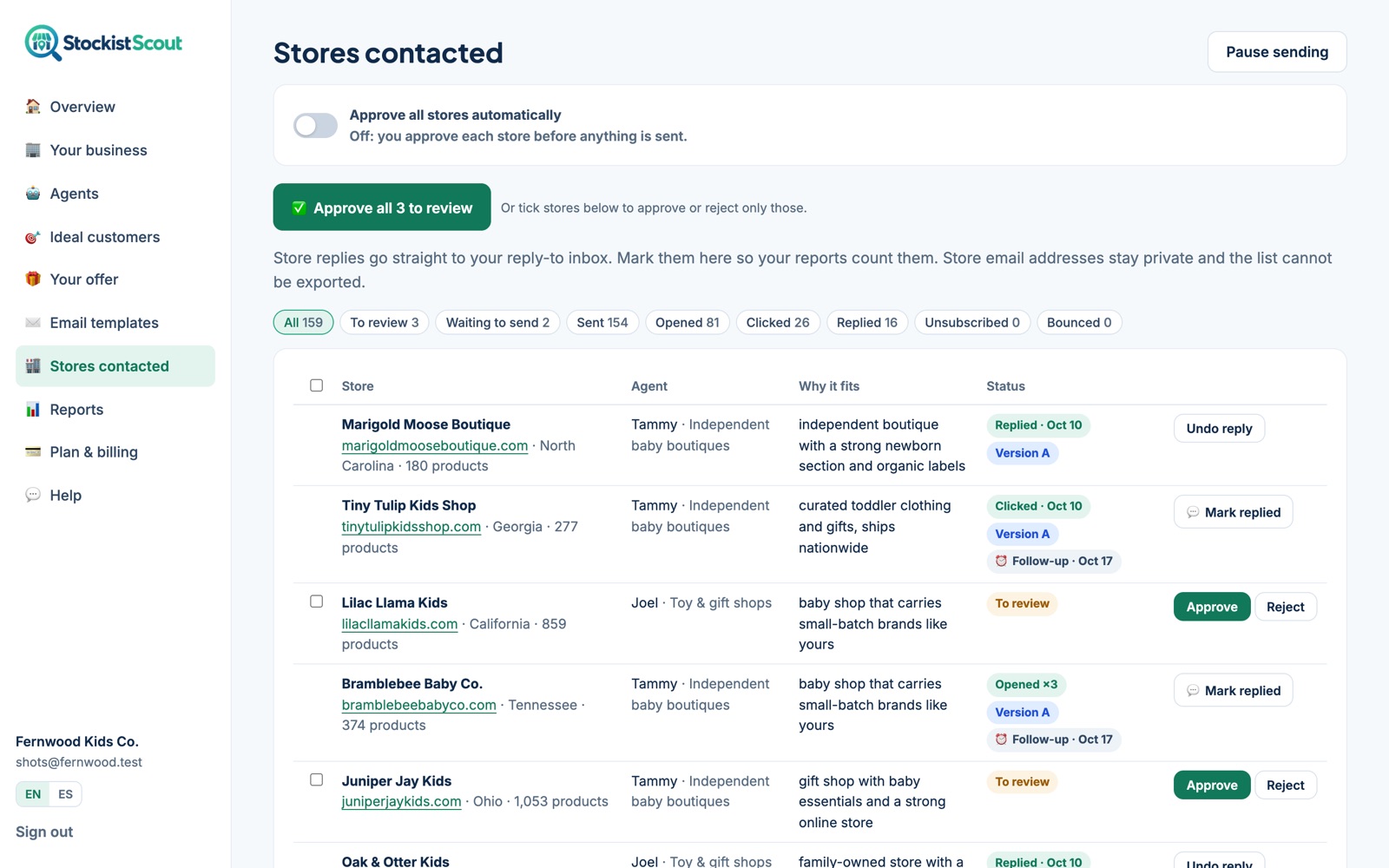
Your agent looks for stores that match your ideal customer: type, niche, area, size and the signals you gave it, minus the ones you excluded.
The why for every store
Every store comes with a line that says why it fits. If the reason does not convince you, you know exactly what to correct.
A specialist per store type
Each ideal customer gets the agent who specialises in that kind of store. Up to eight, each with its own search and report. Meet the agents.
You decide who gets an email
A new agent’s first stores wait for you: nothing is sent until you approve the ones that fit. After that, you choose: automatic approval or one by one. The ones you reject are never proposed again.
Write
Its own email for each store
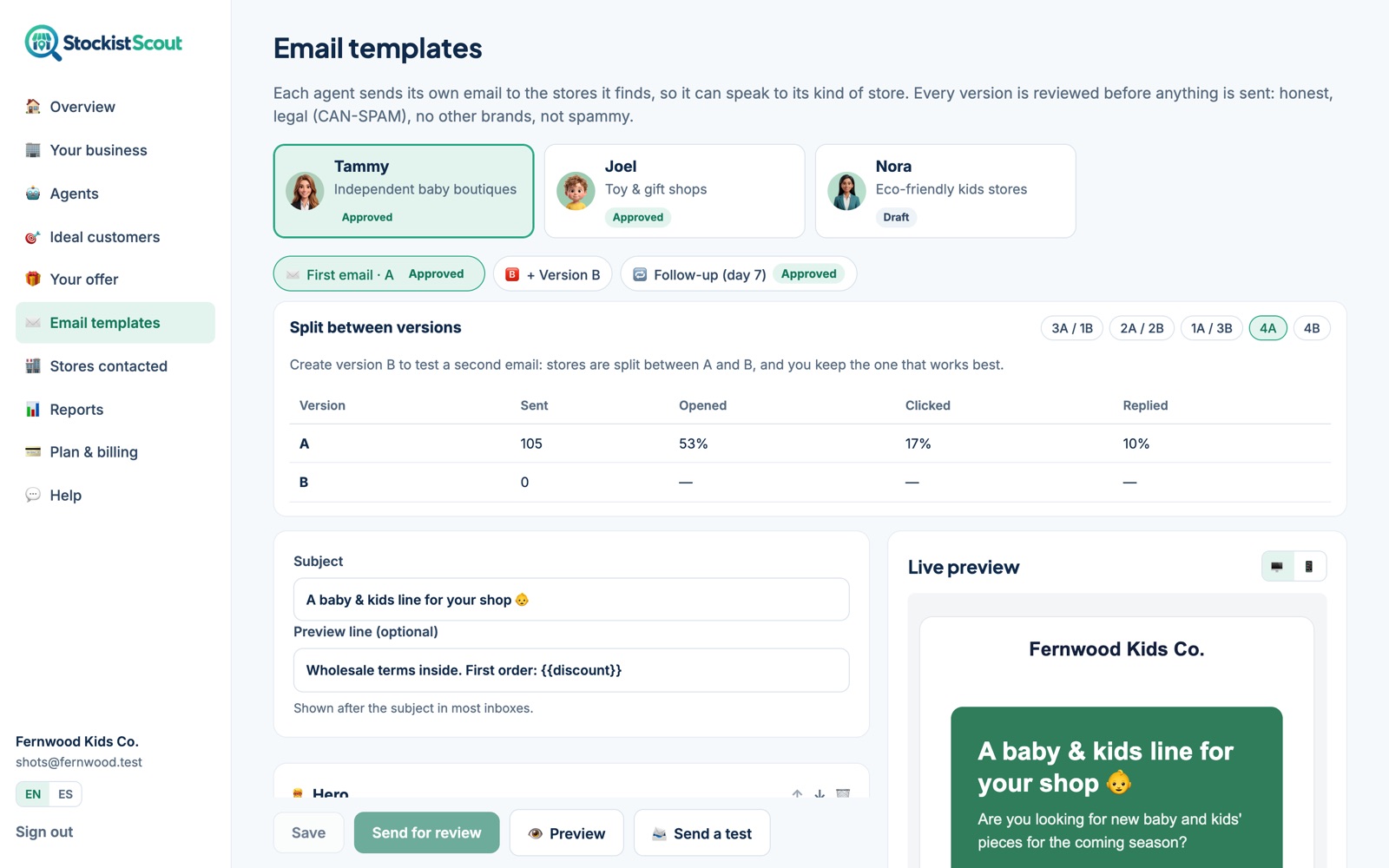
It starts from your approved template and mentions what makes that store a fit for your products. It is not the same email for everyone.
Your name and your reply-to
The email carries your business name and your email as the reply-to. It goes out from our sending domain, never yours, and on a paid plan your account gets its own sending subdomain: your reputation never depends on anyone else’s.
Your offer, clearly
Minimum order, terms, samples, an opening discount and the next step you want: what you put in the questionnaire, said in the tone you chose.
Your gallery, in every email
Your gallery fills itself from your website: your best-selling products if you have an online store, or photos of your rooms, amenities and surroundings if you run a hotel. Keep up to 36, remove any or add your own: every email shows a few of them as a sample of what you offer, a different choice for each recipient. Each photo is checked before it is sent.
Nothing sends on an unapproved template
Every template, new or edited, stays “Pending approval” until it passes review. An AI (Claude) reviews it automatically and approves it, returns it with the changes requested, or, when in doubt, passes it to a person on our team.
Review helps catch problems, but it is not legal advice and does not guarantee that an email meets every law that applies to you. What your emails offer, and that it is true, remains your responsibility; for legal questions, ask your own lawyer.
- Honest: no false claims or promises you cannot keep.
- No other companies’ brands or names.
- Built to follow CAN-SPAM: a real sender, a postal address and an opt-out.
- Nothing that reads like spam.
Send with care
The limits protect your name and the deliverability of every customer. They cannot be skipped, even when your plan has emails left. Recipients can be in the United States, Mexico, Canada, Guatemala, Honduras, Peru, Colombia, Panama, Argentina, Chile, Paraguay, Brazil, the United Kingdom, Ireland, France (with Guadeloupe and Martinique), Belgium (Brussels, Wallonia and Flanders), Norway, Finland, Estonia, Lithuania, Iceland, Croatia, Israel, the United Arab Emirates, Jordan, Morocco, South Africa, Singapore, Hong Kong, Taiwan, Australia, New Zealand, India, the Philippines or the Caribbean islands (Trinidad and Tobago, the Bahamas, Barbados, the Cayman Islands, Bermuda and Aruba): each agent works one country and writes in its language. Your business can be anywhere; a hotel in Cancún can look for US companies.
Daily cap with a ramp
Sending starts low and climbs gradually, the way a new sender with a good reputation does. The ramp, week by week.
Automatic pause
If bounces go above 2% or complaints arrive, the agent stops until we find out why.
One follow-up, and 30 days of rest
Each customer writes to a store once and, if it does not reply, a single follow-up 7 days later. A store gets at most one email through StockistScout every 30 days, from any customer.
One-click unsubscribe
In every email. Anyone who unsubscribes stays out for good, and you see it on your dashboard.
See and decide
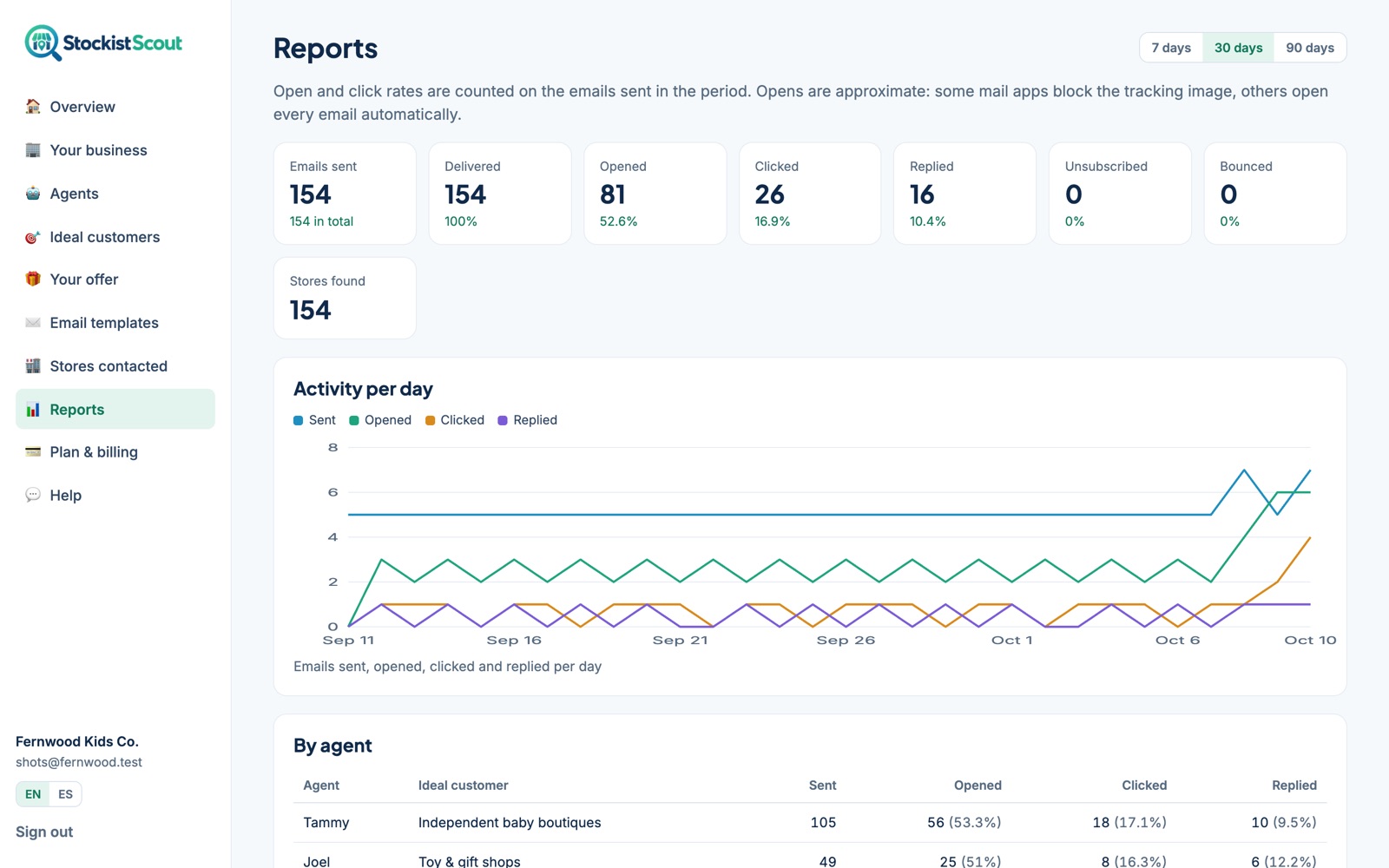
A dashboard with everything
What counts comes first: qualified stores with the why, positive replies and conversations started. Then clicks, unsubscribes and opens, per agent.
Opens, with a warning label
Apple Mail and some security scanners open emails on their own, so an “open” is not always a person reading, and opens come out inflated. The dashboard says so and keeps them secondary; positive replies and conversations are what count.
Pause, resume, edit
Stop an agent whenever you like and pick up later. Edit the template; it goes back to review before it sends.
Replies, in your email
There is no extra inbox to check: stores answer you directly, and the conversation and the order are yours.
Let an agent find your next stockists.
Start with a free trial of 50 emails, no card needed. Set up your business, your ideal customer and your offer, and your agent starts looking.